

Copy Address To Clipboard - button
Copy Address to Clipboard Button
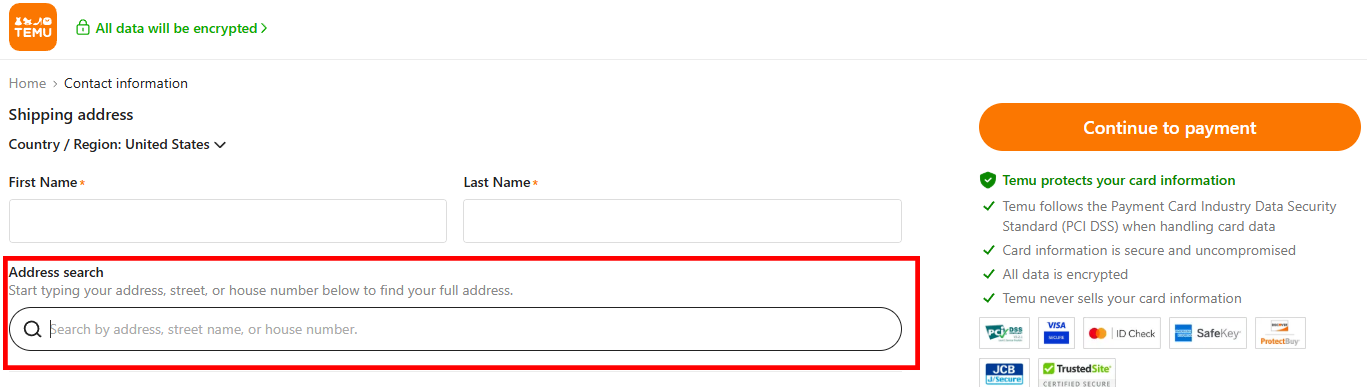
The Copy Address to Clipboard button is specifically designed for websites requiring an address to be pasted fully into a single text box, such as checkout pages with "address search" functionality. A great example is the checkout process on Temu.
How It Works
-
Adjust the Settings:
- Click the two gear icons on the right side of the "Copy Address to Clipboard" button.

- On the settings page, toggle the fields you want included in the copied address (e.g., Address Line 1, City, State, Zip Code).
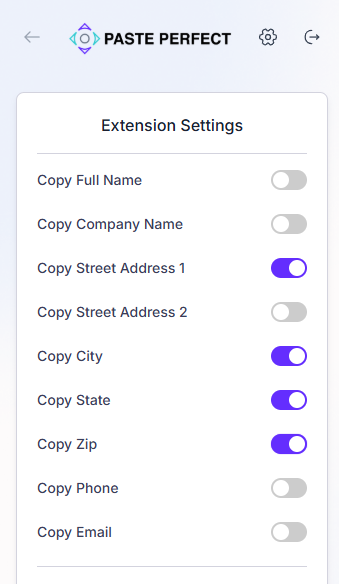
- Once configured, the extension will only copy the selected fields to your clipboard.
- Click the two gear icons on the right side of the "Copy Address to Clipboard" button.
-
Copy the Address:
- Return to the home screen of the extension.
- Click the "Copy Address to Clipboard" button. This will copy the selected address fields to your computer's clipboard.
-
Paste the Address:
- Go to the desired text field on the website.
- Right-click and select Paste, or use the keyboard shortcut
Ctrl+V(Windows) orCmd+V(Mac).
-
Example Output:
When you paste the address, it will be formatted for easy and accurate entry. For instance:123 Paste Perfect Ave, Fairhaven, Massachusetts, 02719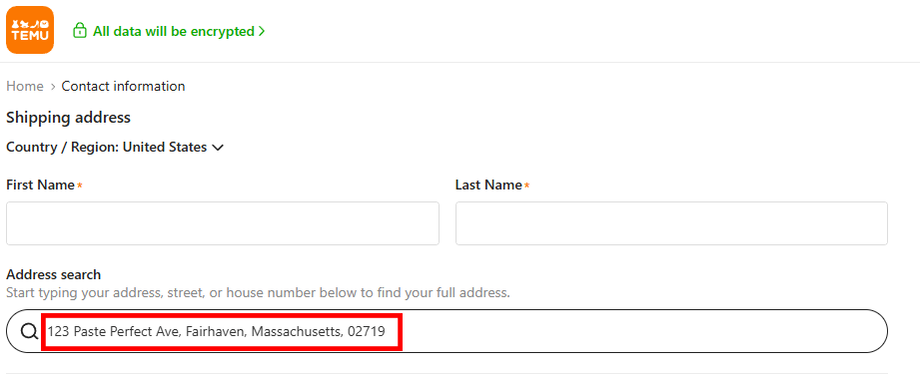
Benefits
- Simplified Data Entry: Quickly and accurately paste addresses into "searchable" fields.
- Customizable Fields: Include only the data you need for specific use cases.
- Time-Saving: Eliminates manual copying and ensures proper formatting.
With the Copy Address to Clipboard button, PastePerfect.Ai adapts to the unique requirements of websites like Temu, streamlining your workflow even further!